

Setting Up Your Webhook: A Step-by-Step Guide
Webhooks are like your personal automation assistants! They're essentially "user-defined HTTP callbacks" that spring into action when specific events occur within Testlify. Imagine a candidate completing an assessment or being invited to take one – webhooks let you know instantly. When these events happen, Testlify sends an HTTP POST request to a URL you've configured. This opens up a world of possibilities for integrating Testlify with your other favorite tools, enabling seamless automation between platforms.
Webhooks v2 is now the defaultIf you set up webhooks before December 25th, 2025, your endpoints are on the legacy system (Webhooks v1). Webhooks v1 will be discontinued on 1st June 2026. See the Migration Guide to move your endpoints to v2.
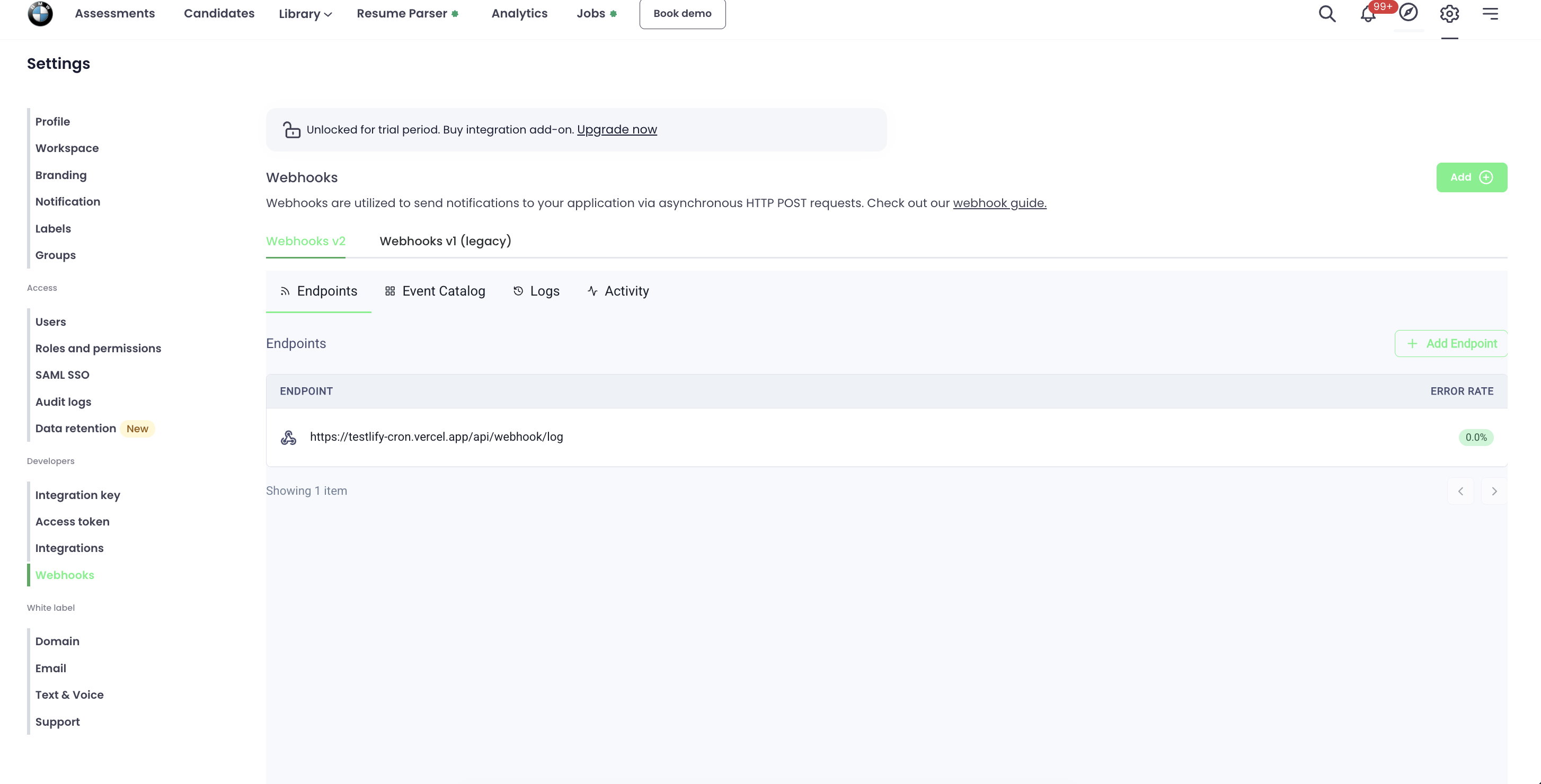
Navigating to Webhooks
- Go to Settings in the top navigation bar.
- Under the Developers section in the left sidebar, click Webhooks.
- You will see two tabs: Webhooks v2 (default) and Webhooks v1 (legacy).
Setting Up Your Webhook: A Step-by-Step Guide
Ready to unleash the power of webhooks? Here's how to add an endpoint in Webhooks v2:
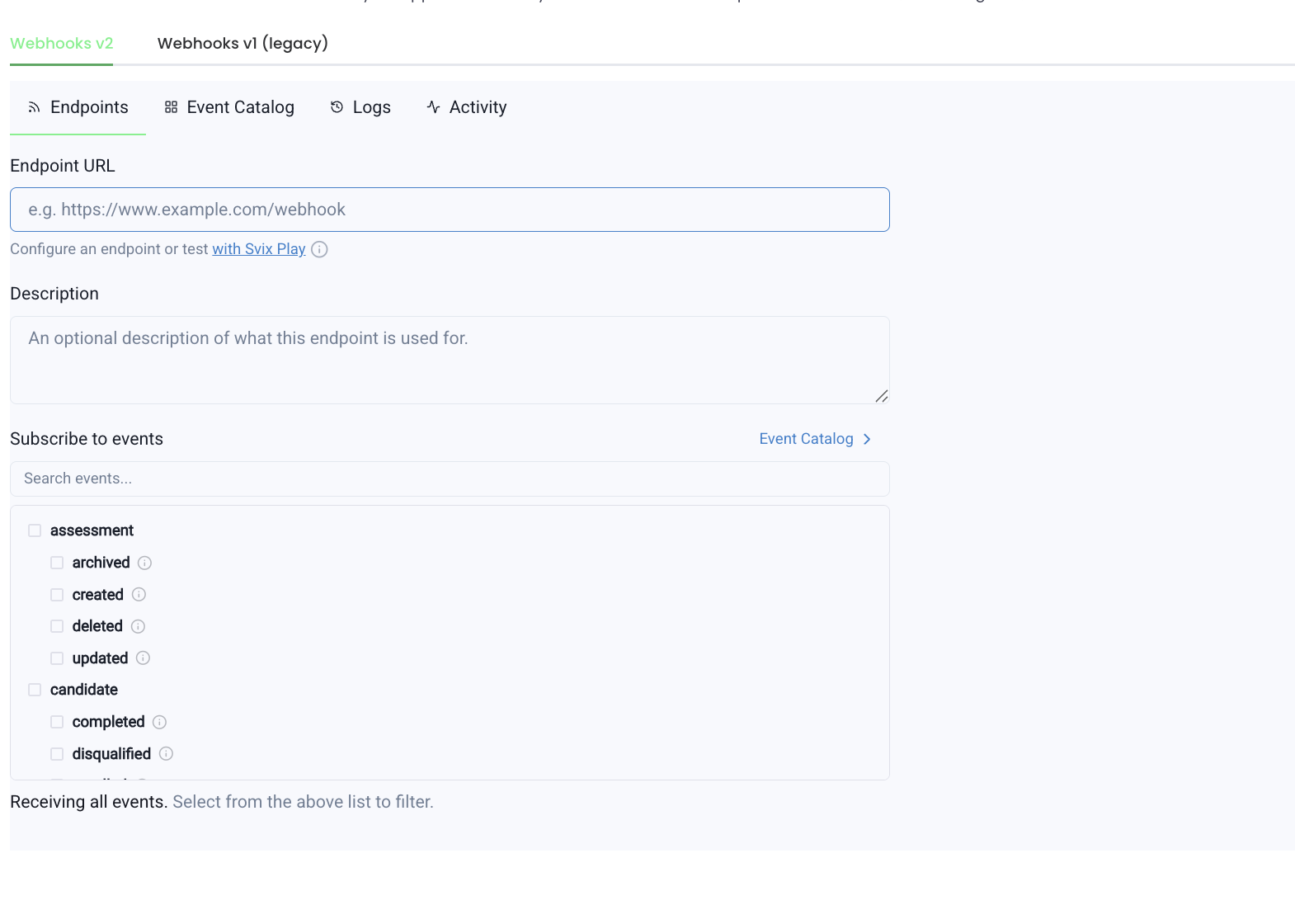
- Click the + Add Endpoint button on the Endpoints tab.
- Enter your Endpoint URL (e.g.
https://your-app.com/webhook). - Optionally add a Description for the endpoint.
- Under Subscribe to events, select the specific event types you want to receive — or leave all unchecked to receive every event.
- Click Save.
Tip: You can test your endpoint using Svix Play before connecting your own URL.
Managing Your Endpoints: Edit and Delete
- Edit: Click on any endpoint to open its settings. Update the URL, description, or subscribed events, then save your changes.
- Delete: Open the endpoint and use the delete option to permanently remove it from your workspace.
Webhook Events: Your Automation Triggers
Webhooks v2 events are grouped into two categories.
Assessment Events: Track Your Assessments with Ease
assessment.archived— fired when an assessment is archivedassessment.created— fired when a new assessment is createdassessment.deleted— fired when an assessment is deletedassessment.updated— fired when an assessment is updated
Candidate Events: Stay Informed About Your Candidates
candidate.completed— fired when a candidate finishes the assessmentcandidate.disqualified— fired when a candidate is disqualifiedcandidate.enrolled— fired when a candidate starts an assessmentcandidate.in_progress— fired after enrollment, once the candidate views the first questioncandidate.invitation_expired— fired when a candidate's invite expirescandidate.invited— fired when a candidate is invited to an assessmentcandidate.invited_for_interview— fired when a candidate is invited for interviewcandidate.rejected— fired when a candidate is rejectedcandidate.score_updated— fired when a candidate's score is manually adjusted
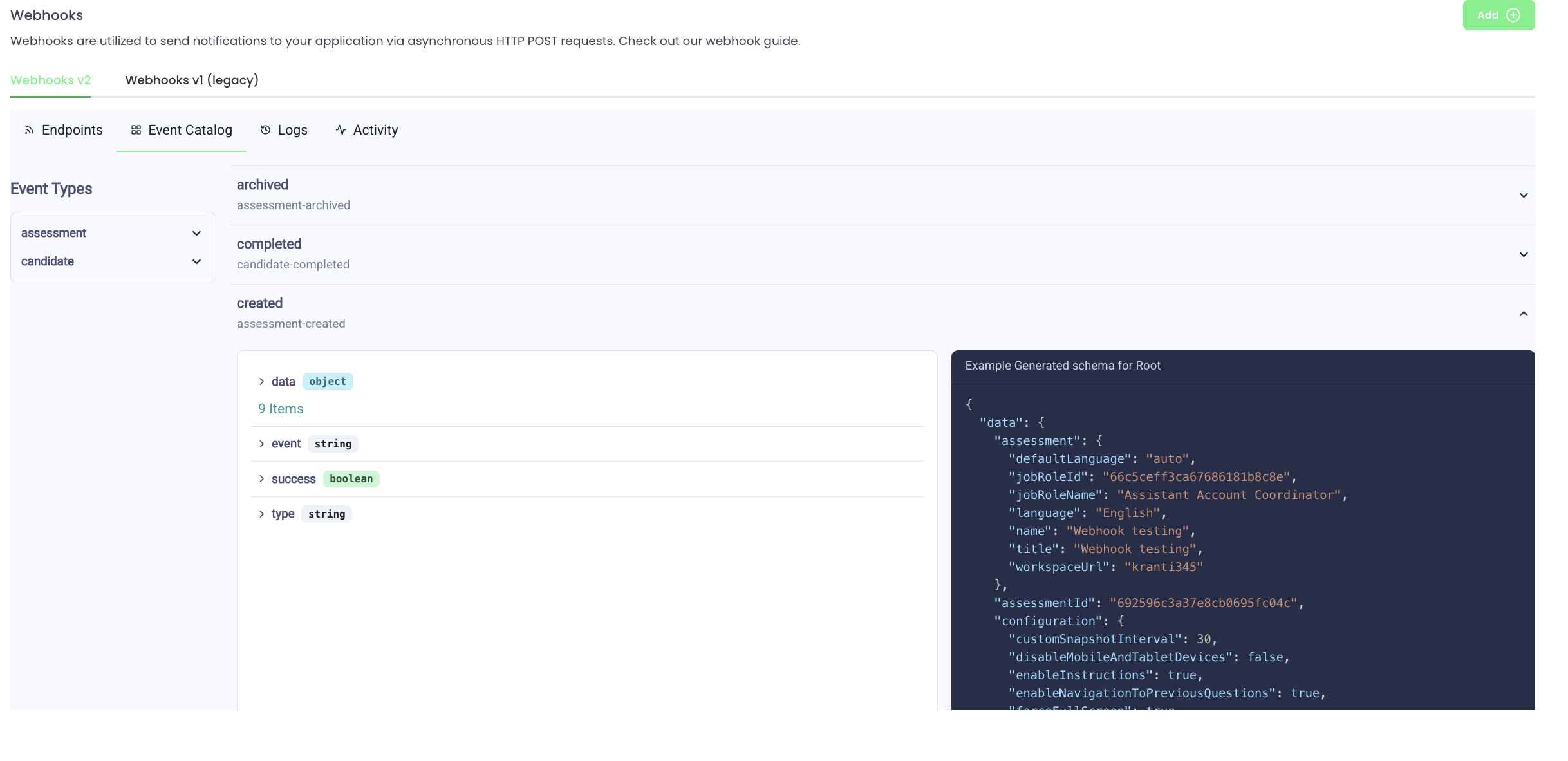
Browse all events, their full schemas, and example payloads in the Event Catalog tab or at the link below:
Logs
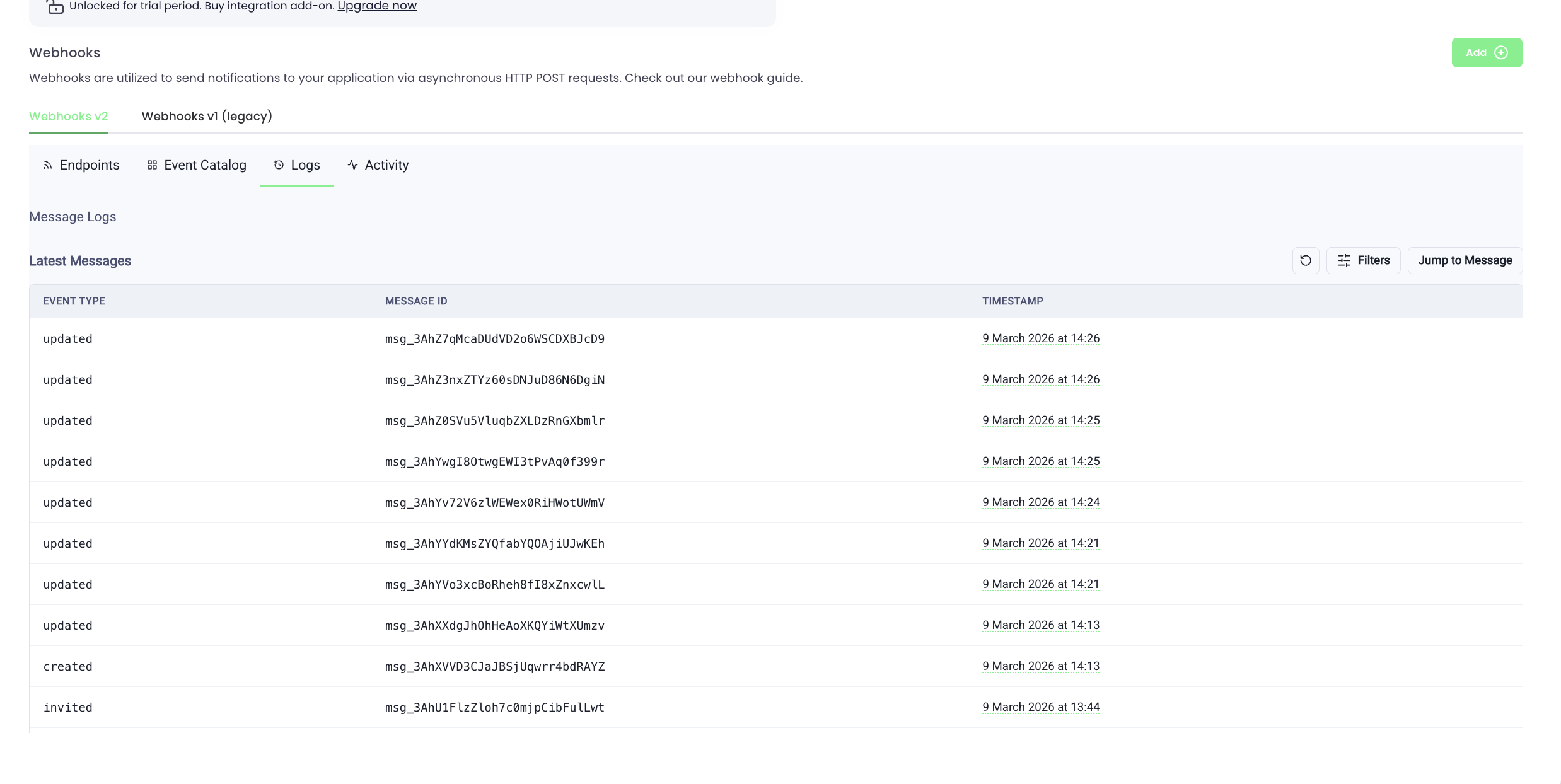
The Logs tab shows a full message log for all events sent to your endpoints. Each entry shows:
- Event Type (e.g.
assessment.created,candidate.invited) - Message ID
- Timestamp
Click any message to inspect the full payload and see the delivery attempt status (Succeeded/Failed) per endpoint.
Activity
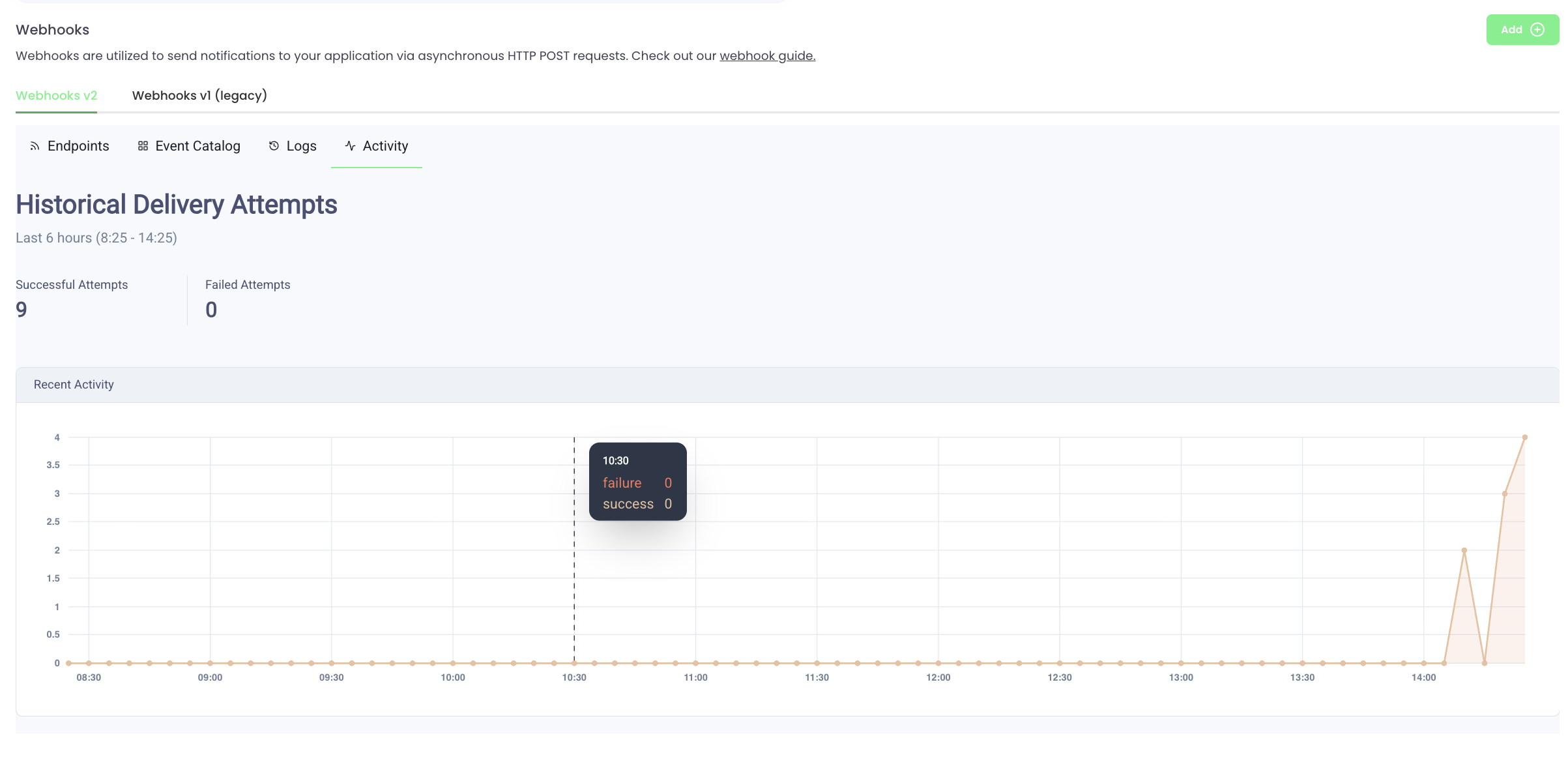
The Activity tab shows a Historical Delivery Attempts chart over the last 6 hours, with a summary of Successful and Failed attempt counts. Use this to monitor the health of your webhook integration at a glance.
Event Payloads (Example)
Webhooks v2 payloads use a richer, nested data structure compared to v1. Below is a sample payload for the assessment.created event:
{
  "data": {
    "assessment": {
      "defaultLanguage": "en",
      "jobRoleId": "62f617d8ded0939121459181",
      "jobRoleName": "Backend Engineer",
      "language": "English",
      "name": "Backend Engineer",
      "title": "Backend Engineer"
    },
    "assessmentId": "69ae8827028c1d180671148e",
    "configuration": {
      "customSnapshotInterval": 120,
      "disableMobileAndTabletDevices": false,
      "enableInstructions": true,
      "enableNavigationToPreviousQuestions": true,
      "forceFullScreen": false,
      "generateAiInsight": true,
      "ipProctoringEnabled": false
    },
    "orgId": "6347ccdc9f898bd2b56cce42",
    "qualificationQuestions": [],
    "status": {
      "assessmentStatus": "DRAFT",
      "isArchived": false
    },
    "testLibraries": []
  },
  "event": "created",
  "success": true,
  "type": "assessment"
}
For full schemas and example payloads for all 13 event types, visit the Event Catalog.
Verifying Webhook Signatures
Every Webhooks v2 delivery is signed so you can verify it actually came from Testlify (and not a forged request to your endpoint). Signatures use the Svix-compatible scheme.
Where to find your signing secret
- Open Settings → Developers → Webhooks and click your endpoint.
- Under Signing secret, click the eye icon to reveal the secret. It will look like:
whsec_MfKQ9r8GKYqrTwjUPD8ILPZIo2LaLaSw - Store this secret in your application's environment. Never commit it to source control.
The secret is unique per endpoint. Rotating an endpoint generates a new secret while the old one stays valid for a 24-hour overlap so you can roll without downtime.
Headers sent with every delivery
Each webhook request includes three headers:
| Header | Description |
|---|---|
svix-id | Unique message identifier — use it to deduplicate retries |
svix-timestamp | Unix timestamp (seconds) when the message was sent |
svix-signature | Space-separated list of v1,<base64-signature> pairs (multiple appear during secret rotation) |
How to verify
The signed payload is the concatenation {svix-id}.{svix-timestamp}.{raw-request-body}. Compute an HMAC-SHA256 of that string using the secret bytes (the part after whsec_, base64-decoded), and compare against any of the signatures in svix-signature.
Always compare using a constant-time function and reject requests where the timestamp is older than 5 minutes to prevent replay attacks.
Verification examples
Node.js (using the Svix SDK — recommended)
npm install sviximport { Webhook } from "svix";
const secret = process.env.TESTLIFY_WEBHOOK_SECRET;
app.post("/webhook", express.raw({ type: "application/json" }), (req, res) => {
const wh = new Webhook(secret);
try {
const payload = wh.verify(req.body, {
"svix-id": req.headers["svix-id"],
"svix-timestamp": req.headers["svix-timestamp"],
"svix-signature": req.headers["svix-signature"],
});
// payload is the parsed, verified event
res.status(200).send("ok");
} catch (err) {
res.status(400).send("invalid signature");
}
});Node.js (manual verification, no SDK)
import crypto from "crypto";

function verify(secret, headers, rawBody) {
  const id = headers["svix-id"];
  const ts = headers["svix-timestamp"];
  const sigHeader = headers["svix-signature"];

  // Reject old requests (5 min tolerance)
  const tolerance = 5 * 60;
  if (Math.abs(Date.now() / 1000 - Number(ts)) > tolerance) return false;

  const secretBytes = Buffer.from(secret.replace(/^whsec_/, ""), "base64");
  const signedPayload = `${id}.${ts}.${rawBody}`;
  const expected = crypto.createHmac("sha256", secretBytes)
    .update(signedPayload)
    .digest("base64");

  return sigHeader.split(" ").some(part => {
    const [, sig] = part.split(",");
    return sig && crypto.timingSafeEqual(
      Buffer.from(sig, "base64"),
      Buffer.from(expected, "base64")
    );
  });
}
Python (using the Svix SDK)
pip install svixfrom svix.webhooks import Webhook, WebhookVerificationError
secret = os.environ["TESTLIFY_WEBHOOK_SECRET"]
@app.post("/webhook")
def handle(request):
try:
payload = Webhook(secret).verify(request.body, request.headers)
return "ok", 200
except WebhookVerificationError:
return "invalid signature", 400Python (manual)
import hmac, hashlib, base64, time

def verify(secret, headers, raw_body):
    msg_id = headers["svix-id"]
    ts = headers["svix-timestamp"]
    sig_header = headers["svix-signature"]

    if abs(time.time() - int(ts)) > 5 * 60:
        return False

    secret_bytes = base64.b64decode(secret.removeprefix("whsec_"))
    signed_payload = f"{msg_id}.{ts}.{raw_body}".encode()
    expected = base64.b64encode(
        hmac.new(secret_bytes, signed_payload, hashlib.sha256).digest()
    ).decode()

    for part in sig_header.split(" "):
        _, sig = part.split(",", 1)
        if hmac.compare_digest(sig, expected):
            return True
    return False
Common gotchas
- Verify the raw body, not the parsed JSON. Re-serialising changes whitespace and breaks the signature. In Express, use
express.raw()on the webhook route. svix-signaturemay contain multiple signatures (space-separated) during secret rotation. Accept the request if any signature matches.- Reject stale timestamps. Without a tolerance check, an attacker who captures one signed request can replay it forever.
- Use constant-time comparison (
crypto.timingSafeEqual,hmac.compare_digest) to avoid timing attacks.
Updated 6 months ago